A CRM and field sales app for real estate teams
- Web app screens
- 8
- Phone app screens
- 6
- Client
- Siteline
- Industry
- Real estate software
- Location
- India
- When
- October 2026, in progress
The number that matters
Time to first reply on a new lead
Baseline
Not yet recorded. We publish it only from the client's own data.
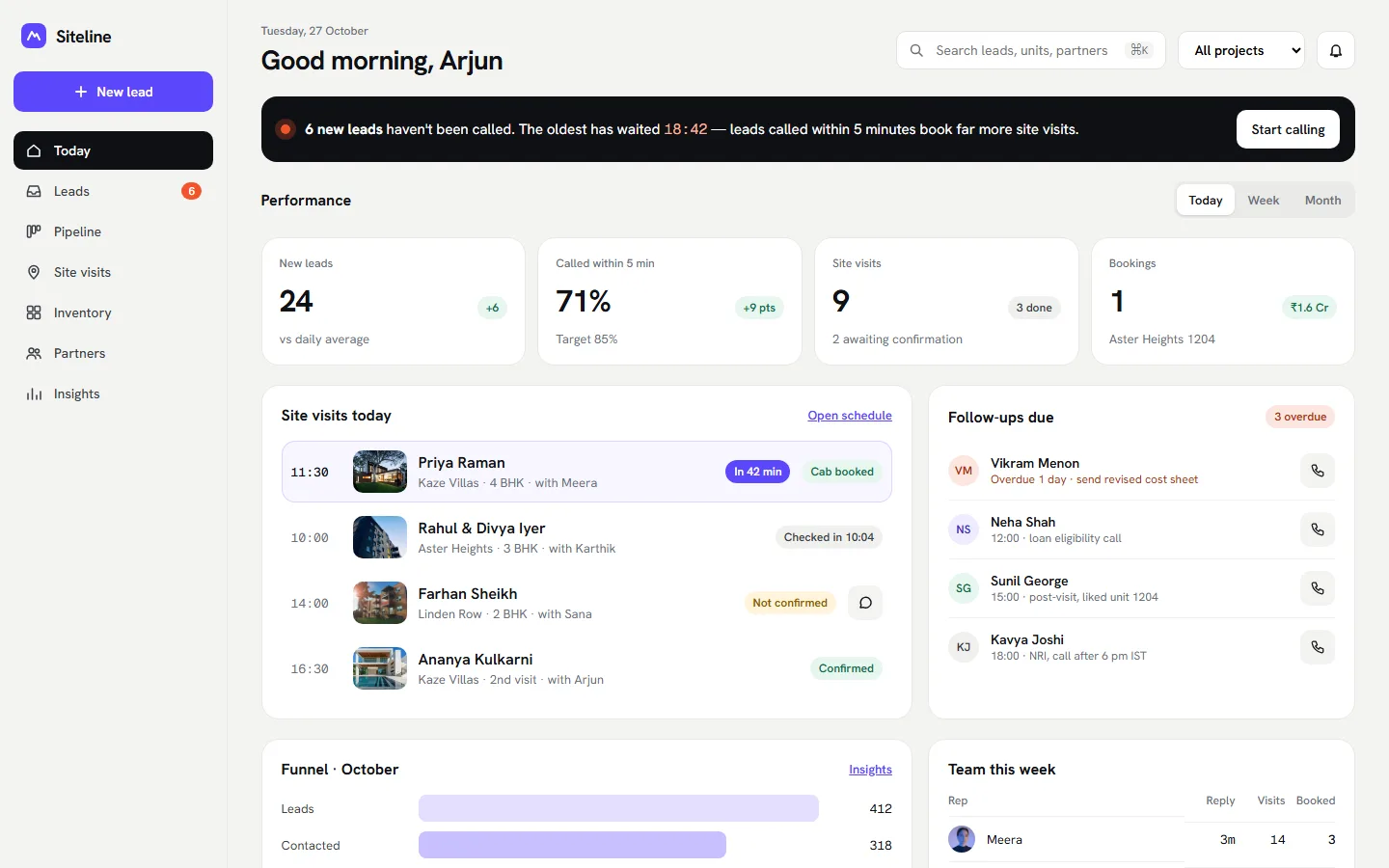
Siteline is a CRM for real estate sales teams. WebMarv is designing a web app with a daily dashboard, a leads inbox, lead profiles, a pipeline, site visits, inventory, channel partners and insights, plus a phone app for the field team. The project is at the design stage and no results are reported yet.
The brief
What they needed.
Real estate leads arrive from ads, portals and channel partners all day. Sales teams often track them in chats and spreadsheets, so a new lead can wait while a site visit is being planned, and nobody can see the whole picture. A purpose-built CRM keeps one record for each lead from first call to booking.
- Show each salesperson who to call first
- Run site visits, from check-in to outcome, on a phone
- Keep units, prices and cost sheets in one place
- Show managers which sources and partners bring sales
What we are building
What WebMarv is building for Siteline.
- 01
A Today dashboard
Visits, follow-ups, new leads waiting and how fast the team is replying.
- 02
Leads inbox and profile
Every lead from ads, portals and partners, with the full history.
- 03
Pipeline and site visits
A board for the stages, and a schedule for visits.
- 04
Inventory and cost sheets
Units and prices in one place, with a cost sheet to share from a phone.
- 05
Channel partners
See which partners bring leads and visits.
- 06
A field app
Call now, site check-in, visit outcome, walk-in capture and units on a phone.
The design
How it looks and works. Select a screen to open it full size.
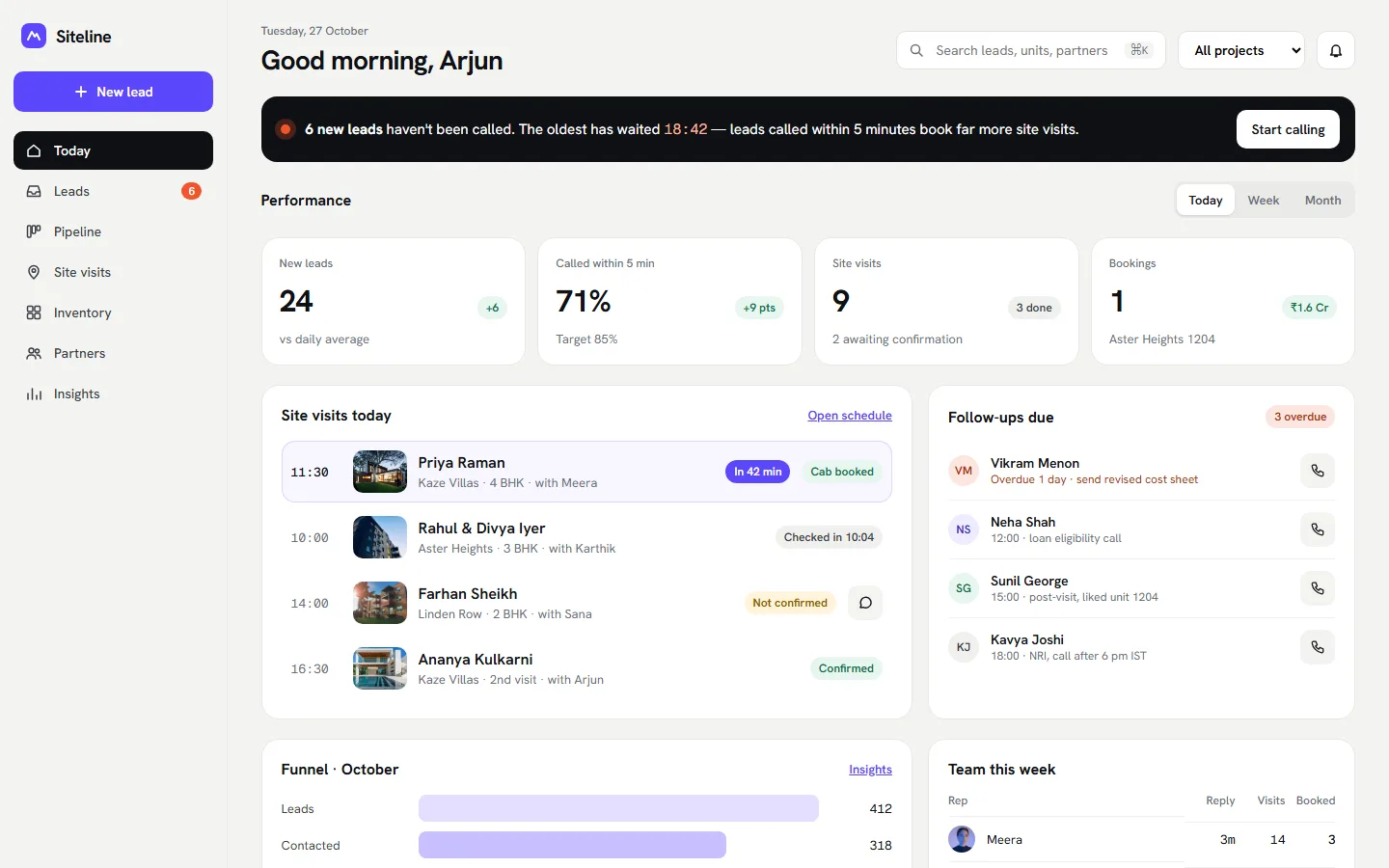
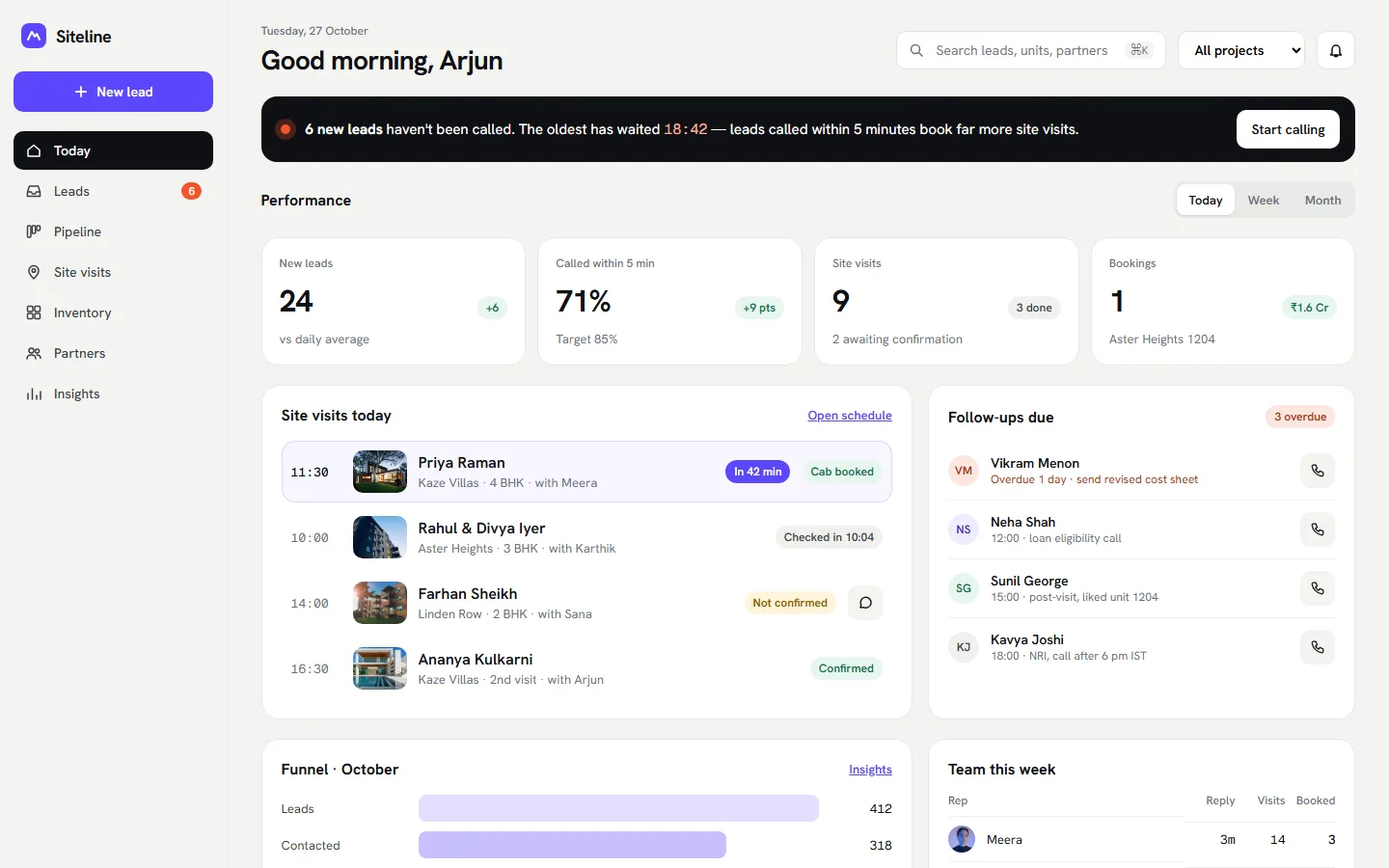
Today dashboard in the web app. Design screen. Text, prices and figures in the design are sample content. 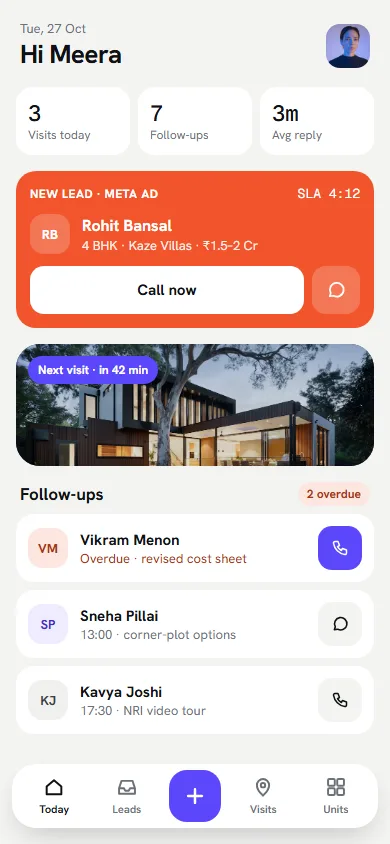
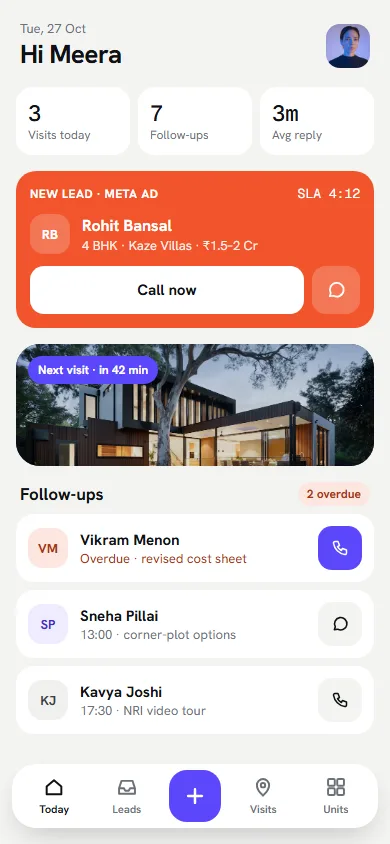
Today screen in the phone app. Design screen. Text, prices and figures in the design are sample content. 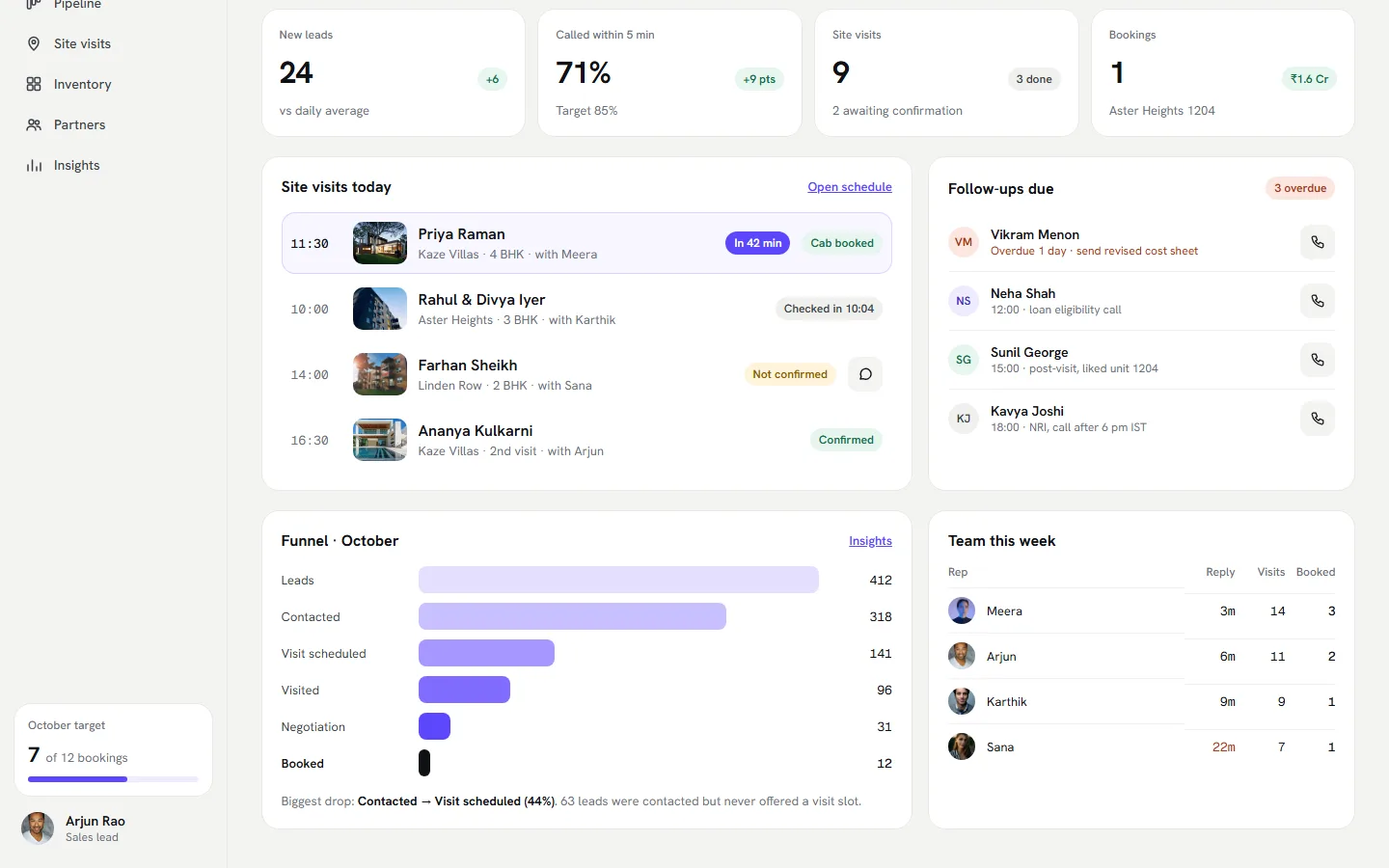
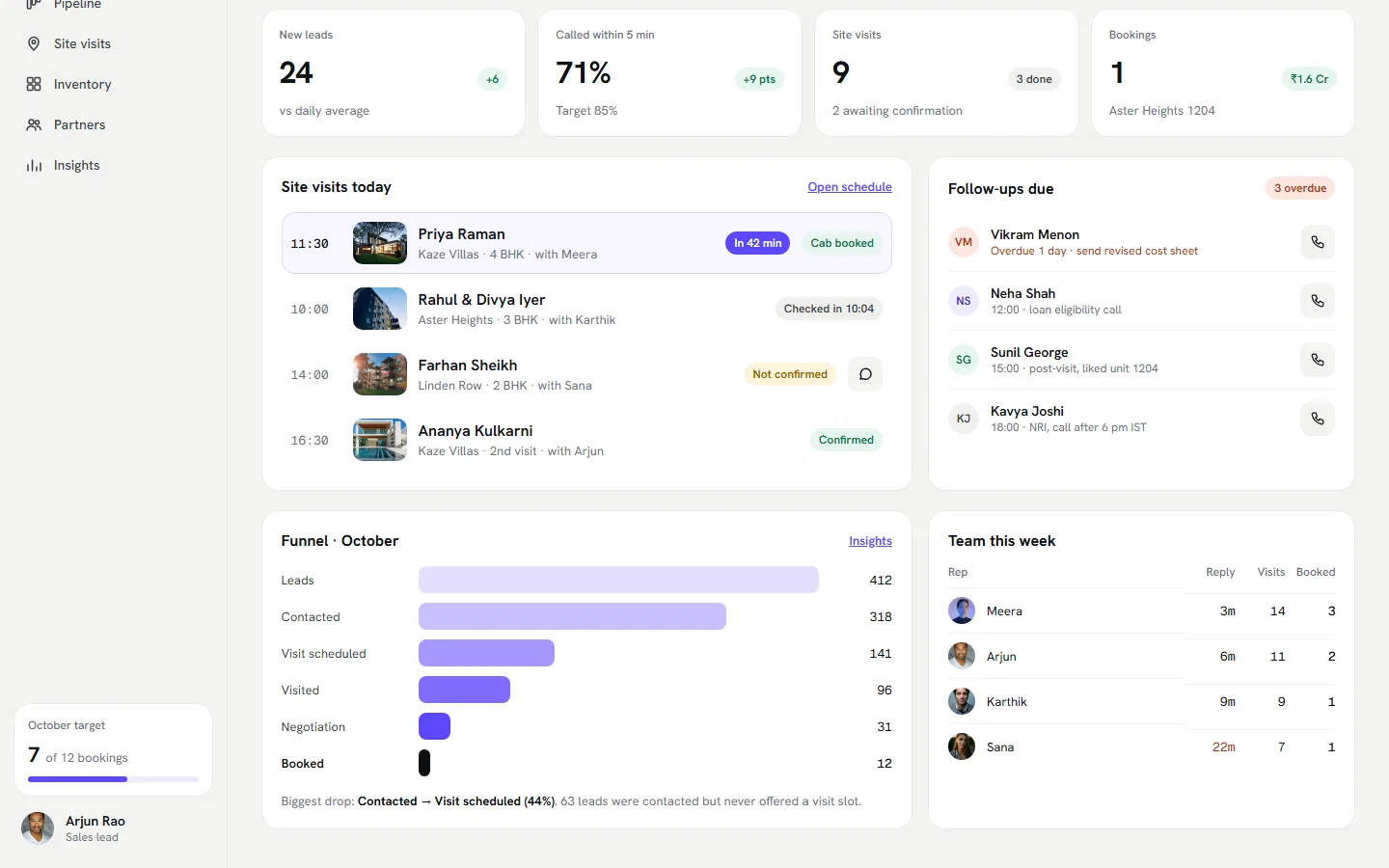
Visits, follow-ups, funnel and team report. Figures are sample data, not results.
How it works
How we are doing it. Step by step.
- 01
Follow the lead
Map the path from first enquiry to booking, for the web team and the field team.
- 02
Put the next action first
Every screen opens on who to call, where to go or what to send.
- 03
Design the phone app for the site
Check-in, outcome and walk-in capture in a few taps, with one hand.
- 04
Report what matters
Sources, partners and pipeline stages in plain charts.
Project status
Where the project stands. Updated as each stage finishes.
- 01 · DONE
Strategy and design
Eight web screens and six phone screens are designed.
- 02 · UPCOMING
Build
The approved design is built as a fast, search-ready site or app.
- 03 · UPCOMING
Launch
Go live, with analytics and enquiry tracking switched on from day one.
- 04 · UPCOMING
Measure and improve
Report results from real data, then improve the pages and steps that matter.
For the business
What this means for the business. In plain words.
Faster replies to new leads
A new lead shows a clear call button and a timer, so nothing waits unseen.
Site visits tracked end to end
Check-in and outcome are logged on the phone, so managers see what happened without chasing.
One place for units and prices
Sales staff can share a cost sheet from the site, without hunting for a file.
Clarity on partners and sources
Managers can see which partners and ads bring visits and bookings, then spend accordingly.
Results we track for this client
- Time from a new lead to the first callSiteline's own lead log
- Site visits held and bookings madeThe sales team's records in Siteline
- Leads, visits and bookings by source and partnerSiteline's insights reports
We publish a number here only after it comes from the source shown. Until then, no result is claimed.
Playbook
How to do this for your own real estate software business. For a real estate developer or sales team deciding whether to build a custom CRM or buy one.
What people search for
| Search | Per month | What it means for the build |
|---|---|---|
| real estate crm software | 1,600 | Buyers pay $3.70 a click in ads, so each organic visit is valuable. |
| real estate crm india | 170 | Small and specific to India. |
| crm for real estate agents | 170 | Agent-side buyers. A different page from developer-side. |
| crm for builders | 140 | Ad cost about $3.18 a click. |
| real estate lead management software | 90 | The pain point in plain words. |
| channel partner management software | 20 | Tiny, but the exact buyer. |
Estimated monthly Google searches in India, pulled 4 Nov 2026 with OpenSEO (DataForSEO). Estimates, not promises.
How the build is organised
- Web app
- A Today dashboard, leads inbox and lead profile, pipeline board, site-visit schedule, inventory with cost sheets and channel-partner reports.
- Field app
- Call now, site check-in, visit outcome, walk-in capture and unit lookup on a phone.
- Data
- One lead record from first enquiry to booking, tagged with source and channel partner.
- Speed
- Show how fast the team replies, because slow first replies lose leads.
- Tracking
- First-reply time, visits booked, visits done and bookings by source and partner.
Technical and design decisions, and what they cost
Build a custom CRM or buy one off the shelf?
Build, because the sales process here has site visits, units and partner payouts that generic tools handle badly.
Off-the-shelf tools are cheaper to start. If a standard tool fits your process, use it. WebMarv will say so.
Web app only or web plus phone app?
Both.
Site visits happen outside the office. A field app records them as they happen. It adds build cost.
Show many reports or a few?
A few that answer: who is waiting, who visited, which source sells.
A long report list goes unread. Add reports when someone asks for them.
A checklist you can reuse
- Write down your lead path from first enquiry to booking before you pick a tool.
- Time your first reply to a new lead. Aim to cut it, then keep measuring.
- Tag every lead with its source, including channel partners.
- Record site-visit outcomes on the day, from a phone.
- Keep unit prices and cost sheets in one place the whole team uses.
- Try an off-the-shelf tool first if your process is standard.
- Review which source and partner produce bookings, not just leads.
This is the approach for this build, not a result. Results are added to this page only when they come from the client's own records, Search Console or analytics.
The math
How the result is worked out. Not just 'revenue went up'.
Faster first reply → more visits booked → more bookings. Measure bookings by source and by channel partner, then cost per booking.
| Input | Where it comes from | Value |
|---|---|---|
| Time from enquiry to first reply | Siteline itself | Not yet measured |
| Site visits booked and completed | Siteline itself | Not yet measured |
| Bookings by source and partner, and sales cost | The client's own records | Not yet measured |
A value is added here only when it comes from the client's own records, Search Console or analytics.
The outcome
Where it stands.
This project is in progress. WebMarv has not published results for it. A result is added here only when it comes from the source shown above.
Questions
Frequently Asked Questions. Clear facts regarding our work for Siteline.
What is WebMarv building for Siteline?+
A CRM web app and a field sales phone app for real estate teams. It covers leads, pipeline, site visits, inventory, partners and reports, and it is at the design stage.
What does a real estate CRM do?+
It keeps every lead in one place, reminds the team who to call, tracks site visits and shows which sources and partners bring sales.
How much does a custom CRM cost?+
Custom business software starts from ₹1,50,000. The price depends on users, workflows and the systems it connects to, and you get a fixed written quote after a free audit.
Are there results to share?+
This project is in progress. WebMarv has not published results for it. A result is added here only when it comes from the source shown above.
Services used
Want similar engineering for your business? These are the disciplines behind this build.
Custom Business Software
Custom software development means building software around your own processes instead of bending them to an off-the-shelf tool. WebMarv builds CRM, ERP, HR, booking, billing, inventory and internal tools, and moves your team off spreadsheets.
Mobile App Development
A mobile app development company designs, builds and launches apps for iPhone and Android. WebMarv builds native and cross-platform apps in React Native and Flutter, connected to your systems and supported after launch.
Website Development
A website development company designs and builds websites and web apps. WebMarv builds company websites, web apps, portals, online stores and SaaS platforms that load fast, rank on Google and turn visitors into customers.
Want similar results for your business?
Slow pages and untracked enquiries cost you customers. Book a free 30-minute audit to find your biggest search and sales leaks.